
Spam text messages are unsolicited and unwanted text messages sent in bulk. These messages are usually sent for commercial purposes but can also be sent for malicious reasons. Spam texts may come from an actual phone number, but they often come from a computer. These messages are sent to phones through SMS or instant messaging. Because spam text services are readily available online, they are cheap and easy to send. Scammers send spoofed text messages to large numbers of people in the hope that a few will respond. Just a couple of responses are all they need to make money.
Receiving spam text messages is annoying and can be costly. You may be charged for the text or reply if you respond to a spam text message. Sometimes, you may also be subscribed to a premium service that will send you additional unwanted texts. Some spam texts contain phishing links that can steal your personal information or infect your device with malware. These texts often look like they come from a legitimate source, such as a bank or retailer, and may even use the branding of these companies. You can do a few things to protect yourself from spam texts, and one of them is to report them.
Here are four easy steps on how to report spam text messages
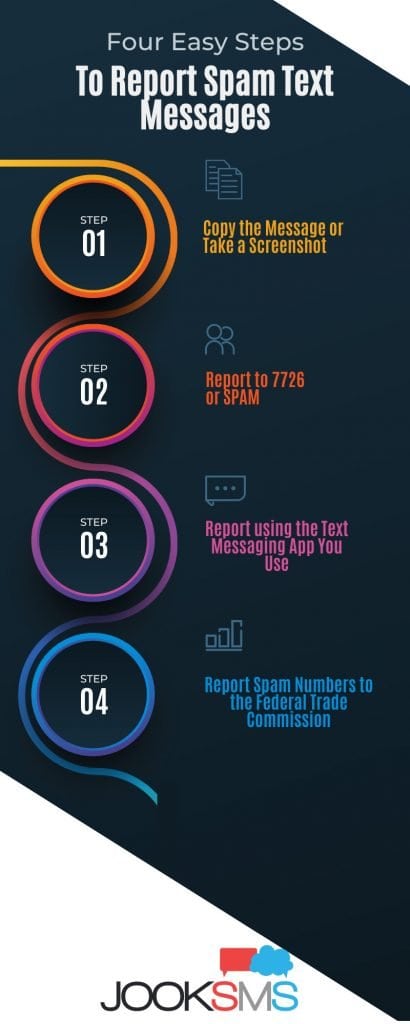
- Copy the Message or Take a Screenshot
The first step for you to do is to take a screenshot of the message that you received or forward it to the 7726 (SPAM). Some people immediately delete the message when they realize that it is spam. Doing this will not stop the spammer, and you will continue to receive more spam messages. Furthermore, replying to the message will also confirm to the spammer that your number is active, and you will receive even more spam. The best thing to do is take a screenshot of the message or forward it to 7726 (SPAM).
- Report to 7726 or SPAM
As technology gets more advanced, so do scammers. Mobile service providers are also improving at identifying spam phone numbers and shutting them down to prevent texting scams in the future. If you’re an AT&T, Verizon, or T-Mobile customer and receive a suspicious or spam message, forward it to 7726 to help protect yourself and others.
- Report using the Text Messaging App You Use
If you’re using an iPhone, there’s also a way to report spam texts through the built-in Messages app. After you open the message, tap on the sender’s name at the top of your screen. Next, select “info.” From there, scroll down and select “report junk.” It will send the message to your carrier’s spam filter and prevent future messages from that number from reaching you.
On the other hand, Android phone users may use spam blockers as an extra layer of security. These apps have access to vast databases that are kept up-to-date, so they can block text scams and spam messages automatically.
The best text blockers for Android block spam texts and usually have features like call silencing and scam recognition. Use an ad blocker on your Android device to be extra safe from these nuisances.
- Report Spam Numbers to the Federal Trade Commission
The best way to protect yourself from text scams is to report them. You can report spam texts to the Federal Trade Commission (FTC). If your carrier does not have a reporting system set up for spam texts or wants to go the extra mile, then you can also report spam texts to the FTC and FCC. Filing a report with additional authorities can only help prevent future issues with spam texts.
To report spam to the FTC, visit their Complaint Assistant page and click Unwanted Telemarketing, Text, or Spam on the left side. From there, select Text from the list. You’ll then need to enter information about the message and sender, such as the phone number sent and what the message said.
What is a Text Spam?
Text spam is any text message sent to a mobile phone without the recipient’s consent. This practice is relatively rare in North America but has been common in Japan for years. In 2001-2002, SMS spam became such an issue in DoCoMo, the country’s primary service provider, that it caused customer screens to freeze and spread programs that made phones dial emergency numbers.
In recent years, mobile phone users have experienced increased text spam. These unsolicited messages contain phishing links from fraudsters. Usually, spam texts come from a computer using an email or messaging app. You probably won’t receive one from another mobile device. Many text spams look like they come from your bank or service provider, offering gifts or some other type of incentive. Though marketing spam texts are annoying, fraudulent texts are what we should be worried about.
These spam text messages trick you into clicking a dangerous link that could give malware access to your device or data. Even worse, they could steal from your bank account. Since our phones are not entirely secure, scammers can access personal information like phone numbers and email addresses. They may even be able to steal money from our bank accounts if we follow a fraud link.
What are the possible consequences of Text Spam?
Text spam is often ignored, reported, or immediately deleted. However, there are some risks associated with text spam. The possible consequences of falling victim to these fraudulent messages are the following.
- Scammers could gain access to your personal information and use them for their gain.
- You could accidentally click on a dangerous link and compromise the security of your social media, emails, and online banking accounts.
- Malware could be installed on your device without you knowing. It will destroy your files and potentially send out the same malicious links to the people in your contact list.
- You could lose money if you follow a fraud link and log on to a phishing site. Scammers will be able to record your username and password to gain access to your bank accounts.
What are the Best Practices to stay safe from Spam Text Messages?

Text spams are dangerous, but there are ways to stay safe and avoid falling victim to these unwanted messages. Here are some of the best practices to protect yourself from text spam.
1. Do not respond directly to a spam text message.
If you receive any spam text messages, never reply to them. Doing so confirms to the sender that you’re a real person and potential target. Sometimes spammers attempt to deceive recipients into responding by saying something like “text STOP if you want to be removed from our mailing list.” Don’t take the bait. More spam texts and calls will come your way if you reply, so it’s best not to engage.
If you are worried about your account mentioned in a spam text, you may open it from the website. Do not click the links or reply directly to the message. You may also check contact numbers and call them to verify the information you received.
2. Avoid clicking on any suspicious links.
If you click on a link from a spam text message, you could be taken to a fake website designed to steal your money or personal information. In some cases, the website could also infect your phone with malware that may spy on you and slow down your phone’s performance by taking up space on your phone’s memory.
3. Recognize the signs of spam texting.
When receiving text messages from an unknown source, read the message carefully and avoid reacting immediately to the instructions. Check and recognize the signs of text spam.
Scammers often send texts that look like they’re coming from a company you trust, such as your bank or the IRS. Some scammers will try to gain your trust by creating a sense of urgency. They may send you a text message claiming that your account numbers have been compromised or that you will be charged a hefty fee if you do not respond.
The scammers usually use a random phone number that looks realistic because they know you’re unlikely to memorize Netflix’s customer service number off the top of your head. Still, you’re less likely to look it up before replying to a text.
Most spam texts contain shortened or scrambled links. The purpose of any scam text is to get you to click on a link or call a number. These links are always shortened to avoid suspicion, but if you click on them, you could download malware onto your device or end up on a phishing website that steals sensitive information.
4. Make use of third-party spam protection applications
Spam filters come in all shapes and sizes, but third-party spam filters analyze your email before it’s even delivered to your server. This way, you don’t have to wade through junk mail to get to the good stuff.
Spam filters are available as software, hosted services, or on-premise appliances. They scan your incoming emails for spam by evaluating the content, email address, header, attachments, and language of each message.
5. Register your phone number with the National Do Not Call Registry
The National Do Not Call Registry protects your privacy by prohibiting sales calls from actual companies. Adding your phone number to the registry is free and will stop most sales calls immediately. However, if you’re still receiving unwanted calls after signing up for the program, chances are high that these callers are scammers.
The Federal Trade Commission operates a National Do Not Call Registry to stop annoyance calls from salespeople.
6. Take caution when sharing your phone number.
Be careful about who you give your phone number. If you receive a text message from an unknown person, chances are it’s a spammer. Be especially cautious when sharing your number on social media or online dating sites. It’s best to use a disposable phone number when signing up for services that require your contact information. This way, you can protect your privacy and avoid unwanted text messages.
7. Block phone numbers
Blocking phone numbers is another option for you to stop receiving spam text messages. You can block numbers on your phone so that you will no longer receive calls or texts from that number. To do this, find the number in your contact list and select “Block.” It will stop the person from being able to contact you through that number.
Many significant carriers and third-party apps (including Nomorobo, Robokiller, Truecaller, and TrapCall) offer call/text-blocking services if you’re looking to block unknown numbers or spam texts. Please note that using these apps often requires sharing your data with the app itself. Read more about the eight ways how to block spam text.
8. Turn on spam filters
You can also help reduce spam messages by using a spam filter on your mobile device. Mobile devices come with spam filters, and you can turn them on to reduce unsolicited messages from unknown numbers.
For iPhone users, go to Settings and tap messages. You will find the “Filter Unknown Senders” in this tab. You can activate this by swiping the button over to the right. All future messages from any number not in your contacts will appear in the “Unknown Senders” tab, which is located under “Filters.”
Android users may also use their device Spam protection. Go to messaging app, and tap the three-dot icon in the upper right-hand of the screen. Tap on Settings and choose Spam Protection. Scroll to find “Enable Spam Protection” and turn it on by swiping to the right.
Are there alternatives to get rid of Text Spam Messages?

Yes. There are several alternatives to getting rid of text spam messages. One of the most effective methods is to use third-party spam blockers. There are free and paid apps that will help you stop spam texts from coming to your phone. Spam blockers are easy to download and use. After installing the app, you need to add keywords to filter unwanted text messages from unknown senders. Doing this will ensure that other essential messages still reach your inbox.
Is ignoring a Spam Text Message can be harmful?
Yes, it can be very harmful to ignore spam text messages. Scammers will continue to send you messages in the hopes that you will eventually respond to their messages. Receiving more messages will become annoying, and it may force you to respond to their notification. You may, also click on malicious links in the message if it remains in your inbox unmoved. The best way for you to handle spam messages is to report them and then delete them. Turn on your spam filters and use spam blockers to ensure your inbox is safe from future spam messages.
Is Spam Texting Illegal?
Yes, spam texting is illegal in the United States. The CAN-SPAM Act of 2003 makes sending unsolicited commercial text messages illegal. If a company sends you an unsolicited text message, you can file a complaint with the Federal Trade Commission (FTC). The FTC will investigate the company to see if it has violated the law. Auto-dialers that use sequential or random number generators to send unsolicited messages to several people simultaneously are also against the law.
Is Text Spam the same as Phishing?
No. Text spam and phishing are different, though they have similar goals. Phishing is an online scam where scammers trick you into giving them personal information such as your passwords or credit card numbers. They pretend to be trustworthy companies such as banks or financial institutions. Phishing is often done through emails, where you receive notifications and a link that will lead you to a fake website.
Text spam is a form of unsolicited commercial text message sent to your phone without your permission. These messages often try to sell you something or promote a service. They can be annoying, but they are not as harmful as phishing scams. Text spams become harmful when they contain links leading to phishing pages. Be careful not to click on any links in text messages unless you are sure of the sender. If you think you have fallen for a phishing scam, immediately report it to the FTC. Read more about what is SMS phishing.