
SMS phishing is an attack from cybercriminals using text messages. SMS phishing is also known as smishing messages aimed at stealing personal data or scamming the recipient by asking for bank and credit card information. According to NPR, more than 47 billion SMS phishing texts were sent in 2021, a 55 percent increase from the previous year. This data shows that smishing is on the rise and becoming a bigger problem.
SMS phishing can be stopped and prevented. Your best step is to block the text sender—don’t click any links!—and report the spam. Then, delete the text from your phone. Silence is always the best policy when it comes to stopping SMS phishing. Not responding to spam texts, even with “stop,” is a good idea. Spam messages are frequently sent by programs that send them out in bulk. When you respond to a text message, you’re allowing the spammer to know your number is active and working, encouraging them to continue sending messages.
Listed below are the four ways on how to stop receiving SMS phishing messages.
1. Open Settings.
2. Scroll down and locate Messages.
3. find Filter Unkown Messages
4. Tap to turn it on, and You’re done.
1. Open Settings.
The first step to stop receiving phishing SMS and other unwanted text messages is to block them from your phone. Most phones have a built-in blocking feature found in the Settings app. Open the Settings on your phone and tap on it.
2. Scroll down and locate Messages.
Next, to find the blocking feature on your phone, scroll through the settings until you see “Messages.” In the Messages section, locate the “Filter Unknown Senders” or “Block Messages from Unknown Numbers” option and turn it on.
3. Find Filter Unknown Messages or Block Messages from Unknown Numbers.
Once you have located the blocking feature, please turn it on to start filtering out unknown and unwanted text messages. It will stop SMS phishing and other spam messages from reaching your phone.
4. Tap to turn it on, and You’re done.
After you have turned on the blocking feature, all future SMS phishing and spam texts will be blocked from your phone. You can also use this feature to block known spam numbers from sending you text messages. It is an effective way to stop SMS phishing and other unwanted text messages.
How to Stop SMS Phishing from an Android Phone?

There are also four simple steps to stop SMS phishing using Android phones. There will be slight variations in steps based on what type of Android phone you are using.
1. Go to Messaging App
2. Locate and tap the three dots icon
3. Find Settings/Block Option
4. Scroll and look for Enable Spam Protection/ Block Messages from Unkown Number, and you’re done.
1. Go to Messaging App
Open the Messaging app on your Android phone. It is where all of your text messages are stored and managed.
2. Locate and tap the three dots icon
You will see a three-dot icon in the top-right corner of the screen. Tap on this icon to open the menu.
3. Find Settings/Block Option
In the menu, locate and tap on the “Settings” or “Block” option. It will take you to the blocking settings for your text messages.
4. Scroll and look for Enable Spam Protection/ Block Messages from Unknown Numbers
Scroll through the list of options until you find “Enable Spam Protection” or “Block Messages from Unknown Numbers.” Tap on this option to enable it. It will stop SMS phishing and other unwanted text messages from reaching your phone.
What is SMS Phishing?
SMS phishing, also known as smashing, is a security attack wherein mobile phone users are tricked into downloading a virus or malware or trick you into giving out sensitive information. SMS phishing has become more prevalent in recent years as people are generally more trusting of messages received through a phone messaging app than an email.
Hackers use SMS phishing to accomplish criminal acts such as stealing personal details by posing as representatives from a legitimate business. They will try to get you to click on a link in the text message that leads you to your bank’s webpage. Once there, they’ll ask you to verify a recent suspicious charge. Another method scammers use is asking their victims to call their customer service number (included in the same text message), so they can talk about a recent suspicious charge or compromised account.
Hackers may also employ kind gestures to steal personal information. Messages about hurricane relief, for example, might be used by the threat actor to request a charity contribution. The cybercriminal requests that you click the supplied link and provide your credit card information, address, and, sometimes, your social insurance number. They charge your credit card monthly to avoid alarming you once he obtains your card number.
What to keep in mind when receiving SMS Phishing?
Do not respond or click on links when you receive a suspected SMS phishing message. It is also essential to remember that legitimate businesses will never ask for personal or financial information via text message. Due to the high number of text messages received by mobile users, hackers use their targets’ lax security to gain access to confidential information.
Many SMS phishing attacks come in the form of urgent alerts that require an immediate response, such as personal passwords, security updates, locked credit or debit cards, and hacked bank account information. These scams often succeed because they exploit people’s instinctual reactions.
Images are more difficult for monitoring systems to parse than websites, meaning that users who click on links in SMS attachments redirecting them to images are left vulnerable.
What are the types of SMS Phishing?
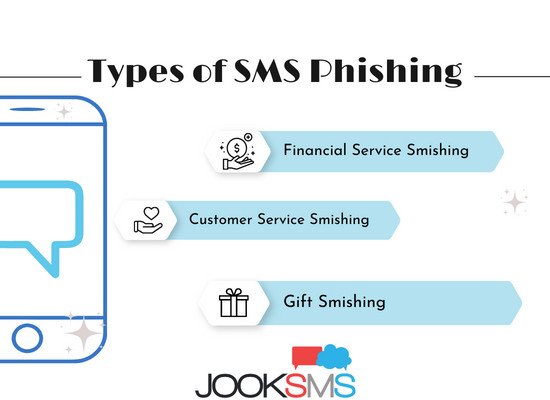
SMS phishing comes in various forms and styles. Although each smishing attack has similarities, the specifics often differ significantly. Attackers can pose as many different people and organizations to make these SMS attacks seem new and avoid detection. Here are some of the most common SMS phishing attacks to look out for.
- Financial Service Smishing – An attacker pretends to be a bank or financial institution to better cloak his identity and perpetrate financial fraud. A financial services smishing scam might include an urgent request to unlock your account, inquiries into suspicious account activity, and more.
- Customer Service Smishing – A customer service smishing scam is one in which the attacker poses as a company’s customer service team. This attack often takes advantage of people upset about an issue with a company’s product or service. The attacker will promise to help resolve the issue if you provide personal information or click on a link.
- Gift Smishing – A gift smishing scam is one in which the attacker tries to trick you into thinking you’ve received a gift. The attacker will send an SMS message with a link to a website asking you to provide personal information or sign up for a service.
How to Prevent SMS Phishing?
SMS phishing is preventable, and users can protect themselves by being aware of the dangers and knowing what to look for in a suspicious text message. By doing nothing at all, you defend yourself from harm. These attacks only cause damage if you accept the bait.
Remember that text messaging is a legitimate method for many companies and organizations to contact you, but not all communications should be dismissed. Therefore, act cautiously, and verify the sender’s identity before responding to any message. Listed below are some tips on how to prevent SMS phishing.
- Be aware of what you click on in text messages. Please do not open any links or attachments unless you are positive they come from a trusted source.
- Do not reply to unsolicited text messages, especially if they ask for personal information.
- Slow down and take your time when responding to text messages. Don’t let the sense of urgency that these messages try to create pressure you into making a mistake.
- Confirm from your bank directly if you are in doubt. If a text mentions that it’s from a legitimate institution but then asks for account updates or login info, beware – this is likely a scam.
- Verify the phone number. Check the back of your card or search online for the customer service number of the organization in question. If the number in the text message doesn’t match, don’t respond or click on any links.
- Use multi-factor authentication. It adds an extra layer of security by requiring a second factor to log in to accounts. Even if someone manages to steal your password, they won’t be able to log in without the code.
- Report any suspicious texts to your carrier. Your wireless carrier can take steps to block the number from being able to reach you.
How to identify SMS Phishing?
SMS phishing can be difficult to spot because attackers constantly devise new ways to disguise themselves. However, some common indicators can help you identify a smishing attack. Here are the steps to identify SMS phishing.
- Check for abnormally long numbers – SMS messages from real organizations will generally come from a short, easy-to-remember number. It is a red flag if you see a long string of numbers.
- Beware of urgent language – Many SMS phishing attacks try to create a sense of urgency to pressure you into responding quickly. If you see phrases like “act now,” “time sensitive,” or “urgent,” be extra cautious.
- Look for grammatical errors – SMS messages from legitimate organizations are usually well-written and free of typos and grammar mistakes. If you see any errors in the text, it’s likely a scam.
- Confirm the sender’s identity – If you’re not sure who sent the text, take a moment to look up the customer service number for the organization in question. You can usually find this information on the back of your card or on the organization’s website.
How to Report SMS Phishing?
There are four simple ways to report SMS phishing and put an end to it. Here is a step-by-step guide to reporting phishing messages and keeping your phone safe from future attacks.
- Forward the message to your carrier’s spam reporting service. It is usually a shortcode such as 7726 (SPAM) or 900. If you have a limited texting plan, this will not count against your overall limit.
- Report Unwanted Texts to the FTC and FCC. Do this by visiting the Compliant Assistant page and clicking “Report Now.” Choose “Unwanted Text Messages” from the drop-down menu and provide as much information as possible.
- Block the number. It will stop future messages from that number from reaching your phone. To do this, open the message and tap “Block.”
- Add the number to the “Do Not Call Registry.” It will stop telemarketers and other companies from calling or texting you. To do this, simply visit the National Do Not Call Registry website and enter your phone number.
Are there tools to block SMS phishing?
Yes. There are apps that you can download to help block SMS phishing messages. These tools are available for iPhone, Android, and Windows devices. SMS phishing blocker apps work by identifying and blocking suspicious texts before they reach your phone.
One popular SMS phishing blocker app is Smishing Defender. This app is available for free on the Google Play Store. Once installed, it will scan all incoming messages and flag any that it believes to be phishing attempts. The app also allows you to report phishing numbers to help keep the community safe.
Another option is the SMS Fraud Blocker app. This app is available for free on the App Store. It works similarly to Smishing Defender, scanning messages and flagging any that it believes to be phishing attempts. The app also allows you to report numbers so others can be warned about them.
Does blocking SMS Phishing Messages prevent SMS Phishing?
Yes. Blocking SMS phishing messages will prevent SMS phishing. However, it’s important to remember that attackers constantly develop new ways to disguise themselves. So, even if you’re using an app to block SMS phishing messages, it’s still important to be vigilant and report any suspicious texts to your carrier.