
Confirming SMS appointments is crucial for businesses engaged in the service sector. Sending SMS appointment confirmations reduces missed appointments and saves businesses time and effort in following up with customers. For businesses, SMS appointment confirmations significantly improve efficiency, lower open appointment slots, and potentially increase revenues by up to 20%. Customers are also more likely to use a service again if they receive an SMS appointment confirmation.
An SMS appointment confirmation is a text message from a business to a customer to confirm an appointment time and date. The message typically includes the recipient’s name, the date and time of the appointment, and instructions on how to confirm the appointment or reschedule it if necessary. Creating an SMS appointment confirmation message is quick and easy, but businesses must follow basic best practices to ensure the message is clear and concise.
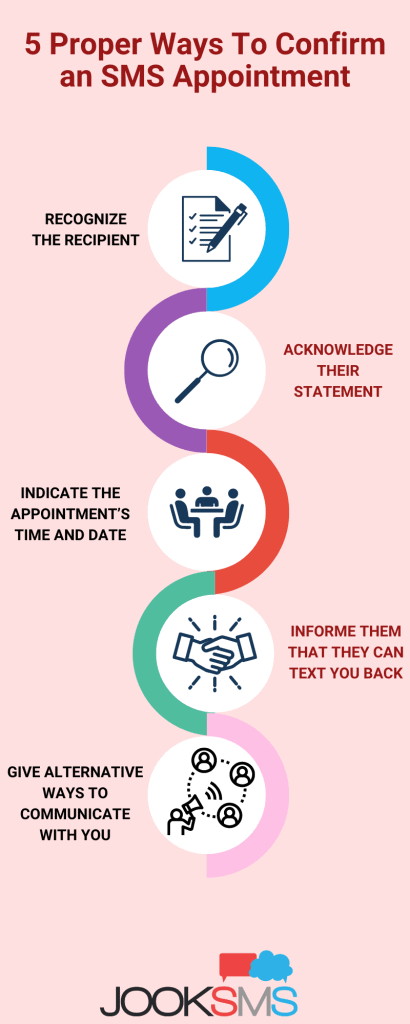
Here is The 5 Proper Ways To Confirm an SMS Appointment
- Recognizing the Recipient
Personalize your SMS appointment confirmation by recognizing the recipient. Start personalizing your marketing messages if you want to improve your business results. A survey by Infosys found that businesses that create personalized content see an increase in sales, profits, and customer loyalty.
- Acknowledging Their Statement
You can improve your business interactions through SMS appointment confirmation by using your customer’s name, but make sure it is appropriate to your company. For example, only first names are acceptable if you have a more casual business like a salon. But if you work for a law firm, consider using formal titles in your SMS greeting.
When you confirm an appointment via text, you must let your customer know that you have received and processed their request. After the customer’s initial contact, this message should be sent as soon as possible.
This simple acknowledgment can be done in several ways, such as by saying, “Thank you for your request” or “We have received your request and will confirm the appointment shortly.”
- Indicating The Appointment’s Time And Date
An SMS appointment confirmation must always include the meeting’s date, time, and location. It’s vital to consider every key detail your customer needs to be aware of ahead of time. For example, will they need to arrive 15 minutes prior, or would directions be beneficial? Do they have to bring along any specific materials or documentation?
Only include what customers need to know for their appointment, so they’re not burdened with excess details.
- Informing Them That They Can Text You Back
Customers should feel comfortable texting you if they need to reschedule their appointment. Include this information in your initial SMS appointment confirmation so customers know they can reach out if there are any changes to their plans.
Business texting is becoming more widely used, but many customers need to know they can text back businesses. It’s beneficial to remind customers that they can reply at the number you sent the original message from. Or, if they prefer to call, provide them with a number to reach you.
Texting is a two-way communication that can be quicker and easier to manage than phone calls or email. Receptionists don’t have to wait for replies, making it more efficient for staff.
- Giving Alternative Ways To Communicate With You
The easier you make it for your customers to communicate with you, the better. They should be able to confirm their appointment via text, and if something comes up, they should be able to change or cancel their appointment via text as well.
Including alternative forms of communication in your reminder texts is a great way to stay connected with customers or patients. If you want to use texting to confirm appointments, you can ask customers or patients to call or email to cancel or reschedule appointments. It helps ensure that no one misses an appointment due to a miscommunication.
For most businesses, it is advantageous to use the same number for business texts and phone calls. Route calls from your business texting number to your phone if they are different numbers.
What is an SMS Appointment?
SMS appointments are text messages that go out automatically according to a schedule of events or appointments. They’re usually automated so that businesses can send many at once. Customers can confirm or cancel their appointments by replying to the text message. SMS appointments should include all the essential details about the meeting, such as date, time, and location.
SMS appointment messages have one primary purpose: to remind the recipients of their upcoming appointment schedule. Your paramount objective should be to get them to show up on time, or if they can’t make it, they reschedule in advance so you can refill your calendar. Know more about What is SMS Marketing and it Best Practices.
Who uses an SMS Appointment?
Businesses use SMS appointments to communicate with their customers or patients. Text messaging is an excellent complement to online appointment-scheduling software for any business. SMS appointment reminders are typically used by companies that rely on appointments, such as doctors, salons, and spas. Educational institutions also use them to remind students of upcoming events, such as class times or office hours.
- Health – By sending reminders to patients of their upcoming healthcare appointments, we can improve patient care while saving time and money.
- Beauty salons and spas – No-shows are common and frustrating, especially when the professional is waiting around to be paid for their time. You can reduce the number of no-shows by sending your clients a text before their appointment is scheduled.
- Automotive – Sending an SMS reminder to customers would reduce the amount of missed appointments for automotive businesses, such as oil changes, check-ups, and tire rotations.
- Hotels – With so many moving parts, you must keep your guests updated on their check-in times, shuttle schedules, and any changes to their itinerary. By sending a text message, you can be sure they get the information they need when they need it.
- Airlines and travel agencies – By text, we can remind passengers to check in and update them if flights are delayed or canceled.
- Education – With text appointments, you can easily schedule meeting with staff, parents, and students- perfect for when you want a high attendance rate or need to communicate changes in time or location at the last minute.
Appointment management can be complex, but your business will save time and money by utilizing SMS to remind clients of upcoming appointments.
How to Confirm an SMS Appointment?
Sending SMS appointment confirmations is easy with the use of SMS marketing platforms. You can use a template for responses and automate the process to reduce the time spent confirming appointments.
When a customer or patient replies to your text message, their response is automatically logged into the system. You can review and respond to them as needed. You can also set up automated responses to confirm the appointment or thank the customer for their reply.
There are also necessary elements that you must include in your confirmation SMS to make it effective. Here is how to confirm an SMS appointment correctly.
First, make your message more personal by customizing the message to include the recipient’s name. Second, ensure that the message consists of the time, date, and location of the upcoming appointment. It is essential to remind the customer of their upcoming appointment.
Third, include a call to action in your message. It could be as simple as asking the customer to reply with a “Y” for yes or an “N” for no to proceed with the confirmation.
Fourth, include an alternative method of communication in your message in case the customer is unable to reply to your text message. It could be a phone number or email address.
Finally, include a link to your website or online booking system if the customer needs to reschedule their appointment.
What are some examples of SMS Appointments?
Depending on your brand and what type of service you provide, the voice and tone of your confirmation message texts will vary. For example, if you’re sending appointment confirmation texts for a nail salon, you can be more relaxed in your language choices. Medical and business appointments usually require a more formal text message than other types of messages. Here are some examples of SMS appointment messages.
Dentistry Appointment Confirmation
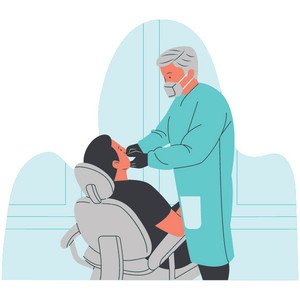
A dentist appointment confirmation should include the service considerations and the time and date of the appointment. It aims to remind the patient of the importance of this service. The message should also include options to reschedule or cancel the appointment if necessary.
“Hello [Patient’s name], this is a reminder that your dental appointment is scheduled for [date] at [time]. Please reply ‘Y’ to confirm or ‘N’ to reschedule. Thank you.”
Medical Appointment Confirmation

A medical appointment confirmation reminds patients of their scheduled check-ups with a doctor or specialist. This period is specifically blocked for them, and it might be challenging to get another schedule should they need to cancel. The message should also include an option to reply for confirmation and a way to reschedule the appointment.
Hi [Patient Name], you have an appointment with [Doctor Name] at 1 PM on July 16th. Just reply “C” to confirm. This time is reserved especially for you and [Doctor Name]. Please give at least 48 hrs’ notice if you can’t attend. All you need to do is call or text this number.
Business Appointment Confirmation

Your customers will have an easier time rescheduling at their convenience than you going back and forth to check availability. Not only that, but by providing them a link to reschedule, there is now a higher chance of someone picking new days/times rather than canceling the appointment entirely.
Good day [Name]. This is a reminder about your appointment with Bistro Vins on Friday, [Date and Time], at [Location]. You can click this link to reschedule: http://txt.st/EBQLJG. If not, reply “C” to confirm your current time slot.
Recruitment Message Confirmation

A text reminder is a quick and easy way to help your client feel prepared for their upcoming interview. It will also help them remember the time and place of the meeting.
Hi [Name]! Good luck with your interview tomorrow. The details are [Date and Time] at [Address]. We are looking forward to meeting you!
Pet and Veterinary Message Confirmation

Remind pet owners about their request for a consultation by sending a text message. It will allow you to quickly answer any questions and provide them with your contact information if they need to reschedule.
Hi [Name]! You’ve requested a consultation for your pet [Pet Name] on Friday, May 10th, at 3 PM. Please reply to this message to confirm or reschedule. Thank you!
Automotive and Mechanic Industry

SMS appointments also work great for automotive and mechanic businesses. It is easier to inform customers that their cars are ready for pick up or remind them about the appointment they booked for their next vehicle check-up.
Hello [Name], we have received your appointment request for [Issue] on [Date / Time]. This maintenance service will take approximately [Time]. To confirm this time slot, please reply with the word CONFIRM. If you need to change the time, respond with HELP.
Insurance Industry Appointment Confirmation

Use SMS appointments to confirm meetings scheduled with clients or customers. It is a great way to improve customer service and make it easier for clients to do business with you.
Hello [Customer Name], this is a reminder that you have an appointment with [Insusrance Agent Name], of [Insurance Company], on Monday at 10 AM. Please reply CONFIRM to confirm this appointment or CANCEL to reschedule. Thank you.
Beauty Salon Appointment Confirmation

Salons and the beauty industry benefits from using SMS appointments as it reduces no-shows and cancellations. It also improves customer engagement and ensures excellent customer service.
Hello [Customer Name], This is from [Salon Name]. You have booked an appointment with [Hair Expert] for the [Service] on [Date and Time]. Please be at the salon 15 minutes early. We are looking forward to meeting you. Please click here to confirm: http://example.com/confirm or reply with CONFIRM.
Are SMS Templates used in SMS Appointments?
Yes, SMS templates can be used in appointment confirmation texts. Using an SMS template can be a great way to save time when sending out mass confirmations. Create your message in advance and input the customer’s name and appointment details when necessary. Using SMS Templates is quick and easy with SMS marketing platforms like JookSMS. These platforms also provide a wide variety of other features that can be useful for businesses, like the ability to track delivery rates and schedule messages in advance.
Is using an Auto Reply Confirmation a nice approach after Clients’ Confirmation?
Yes, auto-reply confirmations are a great way to improve customer service and confirm appointments appropriately. Sending a confirmation text after the customer confirms their appointment ensures customers that their message has reached your business and that you are taking action. It also provides customers with an additional way to contact you if they need to cancel or reschedule their appointment. Auto-reply message templates makes confirmation is a great way to improve customer satisfaction and communication.